
 Support
 Contact
 Sign In



Locating Your Webroot Business Endpoint Protection Antivirus Keycode

Summary:
You can locate your Webroot Business Endpoint Protection keycode by signing into the Webroot portal. This keycode is used to install Webroot Antivirus on your computer.
For best practices on entering your keycode, we recommend copying and pasting the keycode and reviewing Error Appears When Entering a Webroot Antivirus Keycode for additional help.
This article applies to:
| Carbonite Plans | Products | Platforms |
| Core, Power, and Ultimate (Not sure?) | Webroot Business Endpoint Protection (Not sure?) - View the Webroot SecureAnywhere article | Portal |
Solution:
- Sign into your Webroot account at https://identity.webrootanywhere.com/v1/Account/login.
- If you not signed in before, see Creating a Webroot Business Protection Account.
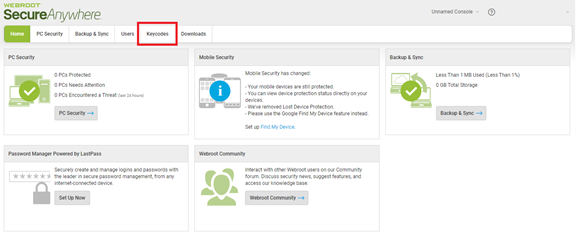
- Click on the Keycodes tab.
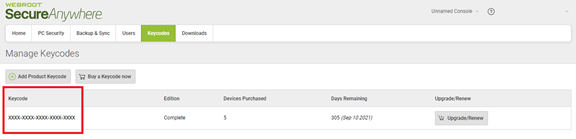
- Your keycode is located under the Keycode column.
Note: The keycode is not displayed in the Webroot SecureAnywhere Antivirus application for Carbonite Safe Backup Pro customers.
After you locate your keycode, you can install Webroot Business Endpoint Protection.
 Feedback