
 Support
 Contact
 Sign In



How to Upgrade from Safe to Safe Backup Pro

- This article is for Windows and Mac
Summary:
Carbonite Safe customers can upgrade to a Safe Pro subscription at any time. Upgrading to a Safe Pro account offers your customers the ability to backup NAS devices and external hard drives. With certain Safe Pro subscriptions, they will also have the ability to back up Windows file servers, databases and live applications. Additionally, your customers will be able to perform an image backup and a bare metal restore of their server(s) with Carbonite Safe Pro.
Solution:
Carbonite Safe Backup Pro plans can help an organization with HIPAA compliance efforts.
To upgrade a Carbonite Safe account to Carbonite Safe Pro, sign into your account at https://portal.carbonite.com.
Once signed in, click Manage my accounts within the Quick Links section for Carbonite Safe.

Then, click the Accounts tab to see a list of all your customers' subscriptions and their respective product plans.

Click the Upgrade link below the expiration date for the Safe account you wish to upgrade.

A screen will display the available upgrades for the customer. Click Purchase to choose a plan from the list.
A warning message will appear at the top of the page stating: By upgrading to Carbonite Safe Pro you will not be able to go back to using Carbonite Safe plans on this account. To proceed with the upgrade, click I understand, continue to purchase.

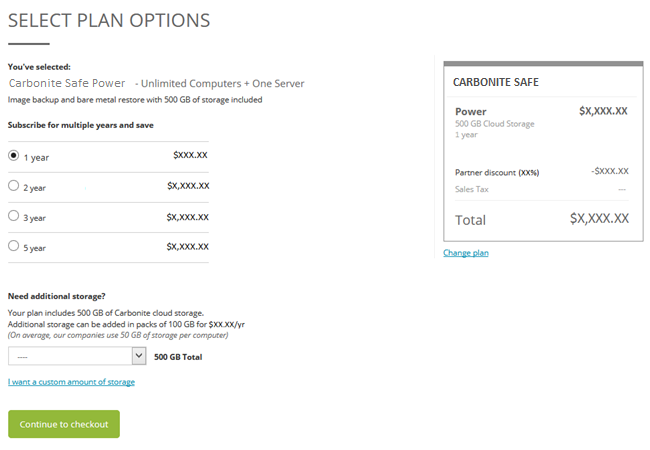
On the next screen, select the subscription length for the upgrade and click Continue to checkout. You will be directed through the purchase process.
Once your purchase is successful, the customer's subscription will be upgraded. Their new expiration date and subscription level will be reflected in your Portal and their account.
 Feedback